If you’ve typed a prompt into ChatGPT and called it a day, you’re only using a small slice of what’s available to you. Natural Language Processing — NLP for short — is the broader field behind the growing world of NLP tools that let computers read, understand, generate, and work with human language. Chatbots like ChatGPT and Claude are part of that field, but they’re far from the whole story.
For working professionals, that distinction actually matters. Knowing the difference between NLP as a whole and the large language models (LLMs) that dominate the headlines can save you time, money, and frustration — because the flashiest tool isn’t always the right one for the job in front of you. A translation task, a meeting transcript, a resume rewrite, and a piece of enterprise text analytics all technically fall under “NLP,” but they’re often better served by a specialized tool than by a general-purpose chatbot.
This guide breaks NLP tools down by what they actually do, matches them to real career goals, and gives you a simple framework for choosing the right one — whether you’re polishing a resume, researching a market, transcribing client calls, or picking your primary AI assistant for daily work.
What Are NLP Tools?
Natural Language Processing is a subfield of artificial intelligence — and, more specifically, sits at the intersection of computer science, linguistics, and machine learning — focused on enabling computers to understand and generate human language. It’s the technology behind spell-checkers, translation apps, search engines that understand what you meant instead of just what you typed, customer service chatbots, and voice assistants.
Large Language Models are one category of NLP technology — a powerful one, built by training massive neural networks on huge amounts of text so they can generate fluent, context-aware language. ChatGPT, Claude, Gemini, and Microsoft Copilot are all LLMs.
Here’s the relationship in one line: all LLMs are NLP tools, but not all NLP tools are LLMs.
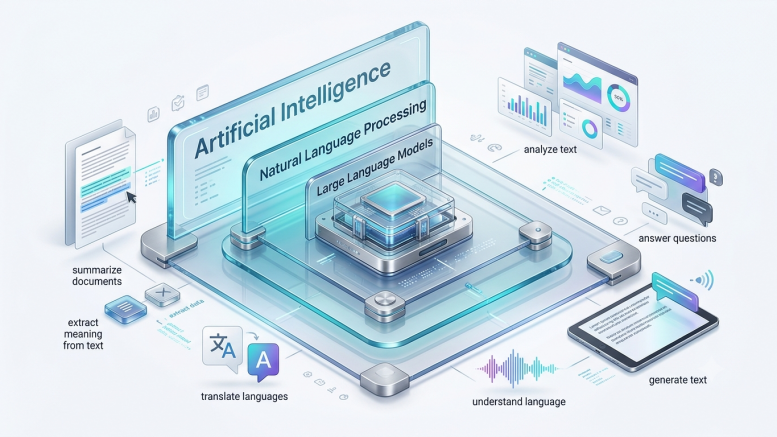

Plenty of genuinely useful NLP tools do one job extremely well without being a conversational chatbot at all — a grammar checker, a transcription engine, a translation API, an enterprise sentiment-analysis platform. Understanding that distinction is the first step to picking tools that actually fit your workflow, instead of defaulting to whichever chatbot is trending.
Categories of NLP Tools
Rather than listing individual products, it’s more useful to think in categories — because the category tells you what a tool is for, and that’s the real decision that matters.
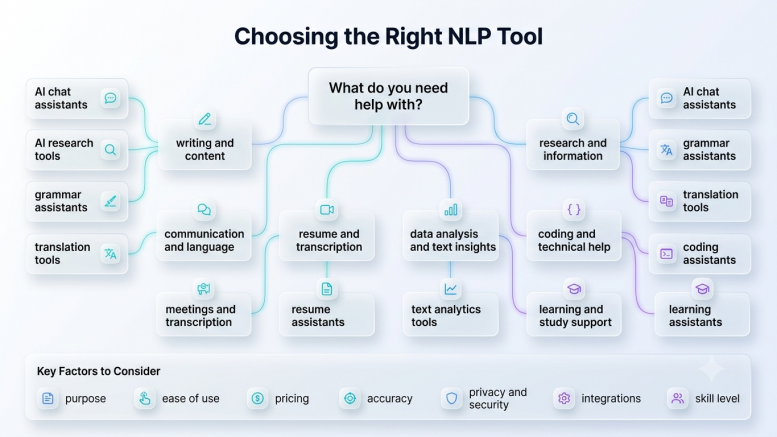

Large Language Models
Examples: ChatGPT, Claude, Gemini, Microsoft Copilot
Career use cases: drafting emails and documents, brainstorming, summarizing long material, coding help, general research, learning new topics through conversation
Strengths: broad flexibility — one tool can plausibly help with dozens of different tasks; fast to get started with no setup; increasingly capable of multi-step reasoning and even taking actions on your behalf
Limitations: can be imprecise for narrow, repetitive, high-volume tasks; outputs need review for accuracy, especially on specialized or fast-changing topics; pricing and feature tiers change frequently, so it’s worth checking each provider’s current plans before committing
AI Search & Research Tools
Examples: Perplexity, Consensus, Elicit
Career use cases: literature and market research, fact-finding with citations, quickly scanning academic or industry sources
Strengths: built specifically to surface sources and citations rather than just generate prose, which makes verification much easier than with a general chatbot
Limitations: narrower scope than a general LLM — great for finding and summarizing existing information, less suited to open-ended creative or drafting work
Writing & Grammar Assistants
Examples: Grammarly, ProWritingAid
Career use cases: polishing emails, reports, and client-facing writing; catching tone and clarity issues an LLM might not flag by default; maintaining consistency across a team’s writing
Strengths: purpose-built for editing rather than generating from scratch — often faster and more precise for that specific job than asking an LLM to “check my writing”
Limitations: doesn’t generate original content or do research; works best as a final editing pass rather than a first-draft tool
Translation Tools
Examples: DeepL, Google Translate
Career use cases: cross-border communication, translating documents or client messages, working with international teams
Strengths: specialized translation models frequently outperform general LLMs on nuance and idiom for supported language pairs, and are typically faster for straightforward translation tasks
Limitations: limited outside their core translation function — not a substitute for a general writing or research assistant
Meeting Transcription & Speech-to-Text
Examples: Otter.ai, Fireflies.ai
Career use cases: transcribing client calls, meetings, and interviews; generating searchable notes and action items automatically
Strengths: built specifically around real-time audio capture and speaker separation — something general LLMs don’t natively do
Limitations: transcription accuracy varies with audio quality and accents; summarization features are often a bonus layer on top of the core transcription, not a replacement for a dedicated writing tool
Resume & Career Writing Tools
Examples: Teal, Kickresume, Resume.io
Career use cases: building and formatting resumes, tailoring applications to specific job postings, tracking job search progress
Strengths: combine NLP-driven writing help with career-specific templates, formatting, and application tracking that a general chatbot won’t have out of the box
Limitations: narrower use case — genuinely useful during a job search, but not a general-purpose writing or research tool
Enterprise NLP & Text Analytics
Examples: IBM Watson Natural Language Understanding, MonkeyLearn
Career use cases: analyzing large volumes of customer feedback, support tickets, or survey responses at scale; sentiment analysis and topic modeling for business intelligence
Strengths: built to process thousands of documents systematically and consistently — a job general chatbots aren’t designed for at scale
Limitations: typically requires more setup and a clearer use case than a chatbot; best suited to teams and businesses processing high volumes of text, not individual day-to-day writing tasks
Best NLP Tools by Career Goal
| Career Goal | Best Tool Category | Why It Helps |
|---|---|---|
| Resume writing | Resume & career writing tools (e.g., Kickresume) | Purpose-built templates and formatting beat generic text generation |
| Interview preparation | LLM (e.g., ChatGPT, Claude) | Flexible mock-interview conversations and feedback |
| Research | AI search tools (e.g., Perplexity, Consensus) | Citation-backed answers you can actually verify |
| Coding | LLM (e.g., Claude, ChatGPT, Copilot) | Strong reasoning across languages and frameworks |
| Academic work | AI search + writing assistant combo | Sourcing plus polish, without over-relying on one tool |
| Customer support | Enterprise NLP (e.g., MonkeyLearn, IBM Watson NLU) | Built to process support tickets at scale |
| Business communication | Writing assistant + LLM for drafting | Draft fast, then polish for tone and clarity |
| Learning new skills | LLM as a conversational tutor | Adjusts explanations to your level in real time |
| Productivity | LLM integrated into existing tools (e.g., Copilot in Microsoft 365) | Fits into workflows you already use |
| Freelancing | Transcription tool for calls + LLM for proposals/emails | Covers both the operational and communication side of client work |
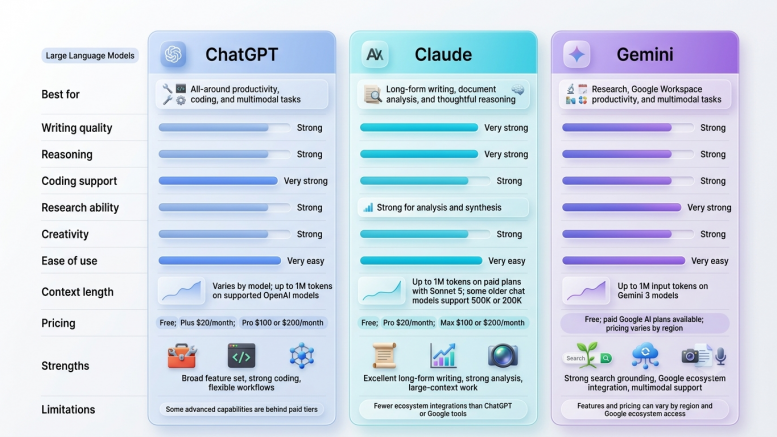
NLP Tools Comparison: ChatGPT vs. Claude vs. Gemini vs. Copilot
This is a comparison within the LLM category — one slice of the broader NLP landscape, not the whole picture (see the categories above for everything else worth knowing about).
| Feature | ChatGPT | Claude | Gemini | Copilot |
|---|---|---|---|---|
| Best known for | All-round versatility and broad tooling | Writing quality, coding depth, long-document handling | Google ecosystem integration, large context windows | Deep Microsoft 365 integration |
| Typical entry price | Free tier; paid ~$20/mo | Free tier; paid ~$20/mo | Free tier; paid ~$20/mo | Bundled with Microsoft 365 |
| Context window | Large, steadily expanding | Large — a consistent strength | Very large, often the biggest of the group | Depends on underlying model |
| Coding ability | Strong, broad language support | Frequently rated among the strongest for complex coding | Strong, especially multi-step reasoning | Strong in Microsoft/GitHub environments |
| Writing quality | Polished, versatile | Often praised for matching a writer’s voice | Strong for longer-form, technical content | Business-writing focused, tuned for Office docs |
| Research | Solid general research support | Strong for deep analysis of long documents | Strong dedicated “deep research” features | Limited outside Microsoft data sources |
| Best for | One flexible tool for almost everything | Writers, developers, document-heavy analysis | Google Workspace users, long-document research | Organizations standardized on Microsoft 365 |

How to Choose the Right NLP Tool
Work through these four questions before you commit to (and pay for) any tool:
- What’s your budget? Most major LLMs offer a genuinely useful free tier — start there before paying for anything. Specialized tools (transcription, enterprise analytics) often have their own separate free or trial tiers worth testing.
- What’s the actual goal? A one-off task (translate this document) usually calls for a specialized tool. An ongoing, varied need (I want a daily writing and thinking partner) calls for a general LLM.
- What’s your industry? Regulated industries (healthcare, finance, legal) should weigh data privacy and compliance features heavily — not just capability.
- Individual or business use? Solo professionals can usually get by with consumer-tier tools. Teams processing high volumes of text — support tickets, survey responses, contracts — benefit from purpose-built enterprise NLP platforms that scale in ways a single chatbot subscription won’t.
If you’re still unsure, start with a free-tier LLM for general tasks, then add a specialized tool only once you notice a specific, repeated task that the LLM handles clumsily.
Common Mistakes Professionals Make with NLP Tools
- Assuming every AI tool is an LLM. This flattens a huge field down to a handful of chatbots and causes people to overlook genuinely better-fit specialized tools.
- Using a general LLM for tasks a specialized tool handles better. Manually pasting call recordings into a chatbot for notes, for example, when a dedicated transcription tool would do it automatically and more accurately.
- Ignoring privacy and data policies. Not every tool handles sensitive business or client data the same way — this matters far more once you’re processing anything confidential.
- Choosing tools based on popularity alone. The most talked-about tool isn’t automatically the best one for your specific task.
FAQs
What is the difference between NLP and LLM?
NLP is the broad field of AI focused on understanding and generating human language. LLMs are one technology within that field, built to generate fluent, context-aware text. Every LLM is an NLP tool; not every NLP tool is an LLM.
What are examples of NLP tools?
Chatbots like ChatGPT and Claude, translation tools like DeepL, transcription tools like Otter.ai, writing assistants like Grammarly, and enterprise text-analytics platforms like MonkeyLearn are all examples of NLP tools.
Which NLP tool is best for beginners?
A free-tier general LLM (ChatGPT, Claude, or Gemini) is the easiest entry point — no setup, broad usefulness, and a gentle learning curve before exploring specialized tools.
Are ChatGPT and Claude NLP tools?
Yes. They’re both large language models, which is a category within the broader NLP field.
Is Grammarly considered NLP?
Yes. Grammarly uses NLP techniques for grammar, tone, and clarity checking — it’s a purpose-built NLP tool, not an LLM chatbot.
What’s the best free NLP tool?
Depends on the task: a free-tier LLM for general writing and research, DeepL’s free tier for translation, or Otter.ai’s free tier for light transcription needs are all solid starting points.
Conclusion
NLP is bigger than any single chatbot — and once you see the field as a set of categories rather than one hyped-up tool, choosing the right one for a given task gets a lot easier. Start with a general LLM for everyday flexibility, layer in specialized tools as specific repeated needs come up, and revisit your choices periodically since this space moves fast. The goal isn’t to use the most AI tools possible — it’s to use the right ones for the work in front of you.
Want to keep building your AI and productivity skills? Explore more learning resources over on LearnHive.